
A CAPTCHA challenge response is the verification token a website receives after a user or browser completes a security check proving it's likely human, not an automated bot. The website presents a challenge — a visible puzzle or an invisible background check — and the response is what gets sent back for verification. According to Imperva's 2026 Bad Bot Report, automated traffic accounted for more than 53% of all web traffic in 2025, which is exactly why this mechanism matters more now than ever. This guide covers how the challenge-response flow works, the main CAPTCHA types, and how to choose the right one for your site.
Here's the deal — I've spent a lot of time digging into how these systems work behind the scenes, and it's genuinely more interesting than "click the traffic lights."
Let's get into it.
What Does CAPTCHA Actually Stand For?
CAPTCHA stands for "Completely Automated Public Turing test to tell Computers and Humans Apart," and yeah, that's a mouthful.
The name tells you almost everything you need to know. It's automated — no human reviews every submission. It's public — anyone can use the test, and the code isn't secret. And it draws a hard line between human users and automated bots.
The concept borrows from Alan Turing's famous test of machine intelligence, except CAPTCHA flips the goal. Instead of asking "can a machine think like a human?", it asks "can we prove a human is actually here?"
Researchers at Carnegie Mellon University built the system and rolled it out in the early 2000s, right as spam and fake account creation became a massive headache for websites. This isn't a new invention — it's over two decades old, which is wild given how much the internet has changed since.
How Does a CAPTCHA Challenge Response Actually Work?
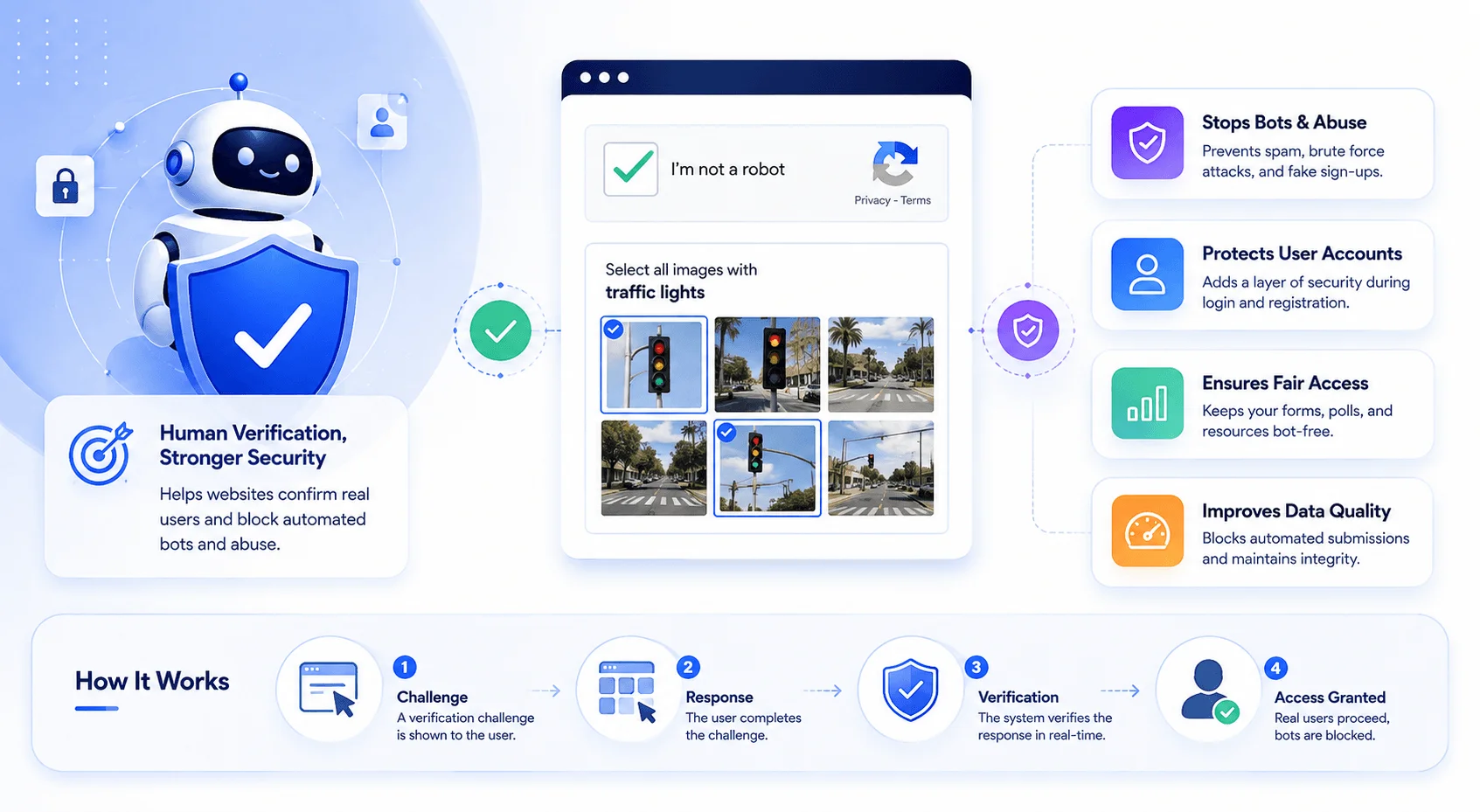
A challenge-response mechanism works in three steps: the site presents a challenge, you respond, and the system verifies that response before letting you through.
I want to break this down further, because the verification step is honestly the most important — and most overlooked — part.
Step 1: The Challenge
The website, or a third-party provider like Google reCAPTCHA or Cloudflare Turnstile, presents a task. That could be a visible puzzle, like selecting crosswalks in a grid of images. Or, increasingly, it's an invisible check running quietly while you're not even looking.
Step 2: The Response
Once you complete the task — or once the invisible check finishes evaluating your browser behavior, device fingerprint, and mouse movement — the system generates a response token. This is a short-lived, usually single-use piece of data attached to your form submission.
That token isn't your literal answer to the puzzle. It's cryptographically signed proof that says "this session passed the check." That distinction matters a lot for how modern bot detection actually functions.
Step 3: Verification
Your browser submits that token with your form, login attempt, or checkout action. The website sends it back to the provider's servers to confirm it's legitimate — unexpired, unused, and issued for that specific site and action.
If it checks out, you're in. If not, you get blocked or challenged again.
Why Do Websites Even Need CAPTCHA?
Websites use CAPTCHA because bots operate at a scale no human attacker could replicate manually — and that scale has grown sharply. It's the same underlying problem that AI content detection tools try to solve on the content side: telling human output apart from machine output, just applied to traffic instead of text. Automated traffic made up 53% of all web traffic in 2025, up from 51% the year before, per Imperva's 2026 Bad Bot Report, with credential stuffing driving 46% of account takeover incidents in financial services alone.
Without any kind of bot mitigation, here's what a site owner is exposed to:
Credential stuffing — bots trying millions of stolen username/password combos against login pages
Fake account creation — spam signups that flood a database and tank sender reputation
Web scraping — automated tools ripping content or pricing data at scale
Form spam — junk submissions clogging contact forms and comment sections
API abuse — Imperva reports 27% of bot attacks now specifically target API endpoints
A CAPTCHA adds friction exactly where that abuse happens — signup forms, login pages, checkout flows, comment sections. It's not a silver bullet, but it meaningfully raises the cost of automated attacks.
Types of CAPTCHA Compared
Not all CAPTCHAs look the same, and the technology has moved a long way from squiggly, near-unreadable text puzzles.
CAPTCHA Type | Bot Resistance | User Friction | Accessibility | Best For |
|---|---|---|---|---|
Text-based | Low — easily solved by OCR tools | Medium | Poor | Legacy sites only |
Image-based | Medium — AI is closing the gap fast | High | Poor | High-risk forms |
Checkbox | Medium | Low | Medium | General signup forms |
Invisible CAPTCHA | High | Very low | Good | Most modern sites |
Cloudflare Turnstile | High | Very low (non-interactive) | Good | Privacy-focused sites |
If you're weighing which one to add to your own web application firewall setup, invisible or Turnstile-style checks are the current best practice — Cloudflare has publicly deprecated legacy CAPTCHA in favor of Managed Challenge for exactly this reason.
Step-by-Step: How a CAPTCHA Verification Flows
Here's exactly what happens from the moment you load a protected page to the moment you're granted access.
You visit a protected page — a login screen, checkout, or signup form.
The system evaluates risk signals — IP reputation, device fingerprint, and request pattern get checked in the background.
A challenge triggers, if needed — risky-looking traffic sees a puzzle or invisible check.
You complete the challenge — by solving the puzzle, or simply by passing behavioral checks as a normal browsing session.
A response token is generated — short-lived, single-use proof of completion.
The token is submitted with your request — attached to the form or API call.
The website verifies the token server-side — pinging the provider to confirm validity, expiration, and domain match.
Access is granted or denied — based on that result.
That's the full loop. Simple in concept, with a lot of engineering packed into steps 2 and 7.
What a CAPTCHA Response Does NOT Prove
A valid CAPTCHA response isn't absolute proof you're dealing with a trustworthy human — it just means one request passed one bot-mitigation checkpoint.
It doesn't verify identity, doesn't guarantee good intent, and doesn't protect everything on your site. CAPTCHA operates at the application layer only. It won't protect your DNS records, your TLS certificates, or your registrar account — those need separate layers of your website security checklist. Think of CAPTCHA as one layer among several, not a complete solution.
The Arms Race: Why CAPTCHA Is Losing Ground
This is the part of the story I find genuinely fascinating.
CAPTCHA exploits a gap — tasks trivial for humans but hard for machines. That gap is shrinking fast. AI-enabled bot attacks surged 12.5x year-over-year in 2025, according to Thales's 2026 Bad Bot Report, with daily blocked attacks climbing from 2 million to 25 million. Many traditional puzzles are now more reliably solved by bots than by frustrated humans (ever failed a traffic-light CAPTCHA three times? Same.).
Meanwhile, the friction created by these puzzles increasingly just annoys real users — especially anyone using a VPN, privacy browser, or tracker blocker, since those tools often trip risk scores even when the person behind them is completely legitimate.
That's exactly why Cloudflare and similar providers are pivoting toward frictionless, signal-based verification instead of forcing everyone through a visual puzzle.
Accessibility: The Part That Doesn't Get Enough Attention
Traditional CAPTCHAs create real barriers for people with visual impairments.
Since most classic formats rely heavily on visual perception, they can be nearly impossible for anyone legally blind or with significantly impaired vision to complete without extra tools. Audio CAPTCHA alternatives exist but come with their own usability issues. If you're choosing a CAPTCHA solution, this deserves real weight — not as a nice-to-have, but as a core accessibility requirement.
Common Mistakes Site Owners Make With CAPTCHA
Over-triggering CAPTCHA on every page load — tanks conversion rate for no added security benefit.
Relying on CAPTCHA alone — pair it with a proper web application firewall (WAF) and rate limiting for real coverage.
Ignoring accessibility — skipping an audio or alternative challenge locks out legitimate users.
Using outdated text-based CAPTCHA — increasingly trivial for bots, frustrating for people.
Not monitoring false positive rates — real users failing repeatedly signals miscalibrated thresholds.
FAQ: CAPTCHA Challenge Response
Is a CAPTCHA challenge response the same thing as the CAPTCHA itself?
No. The CAPTCHA is the challenge — the puzzle or check you complete. The challenge response is the verification token generated afterward, proving to the website that the challenge was passed.
Does a proxy server help you bypass a CAPTCHA challenge?
A proxy can lower the odds of triggering a CAPTCHA by making traffic look less suspicious, but it does not solve the challenge for you.
How long does a CAPTCHA response token last?
Most tokens are short-lived and single-use, typically expiring within minutes, which prevents attackers from replaying a valid response across requests.
Is CAPTCHA free to implement on a website?
Yes. Most solutions, including Google reCAPTCHA and Cloudflare Turnstile, offer free tiers for basic use, with paid enterprise options for higher traffic or advanced bot management.
Why do I sometimes get CAPTCHA challenges even when I'm clearly human?
Usually your IP reputation, VPN usage, or browser fingerprint triggered a risk score — the system is evaluating signals, not doubting you personally.
Can CAPTCHA fully stop bots?
No. It raises the cost and difficulty of automated abuse, but AI-based solving services can still bypass many traditional formats — one reason bot traffic still climbed to 53% of the web in 2025 despite widespread CAPTCHA adoption.
Which CAPTCHA type should I use in 2026?
Invisible or non-interactive options like Cloudflare Turnstile are generally recommended, since they combine strong bot resistance with minimal user friction and better accessibility than visual puzzles.
Wrapping This Up
A CAPTCHA challenge response is the mechanism that lets a website ask "are you human?" and get back a verifiable answer — a token, not a literal puzzle solution.
It's evolved from clunky distorted text toward invisible, behavior-based verification, and with bots now driving more than half of all web traffic, that evolution isn't optional — bot traffic doesn't just threaten security, it also skews the same analytics your SEO tools rely on to measure real performance. Accessibility concerns and an ongoing arms race with AI-powered bots remain real issues, but CAPTCHA is still one essential piece of a broader bot mitigation strategy.
If you're securing a site right now: don't lean on CAPTCHA alone. Pair it with proper rate limiting, a solid WAF, and ongoing monitoring of your false positive rate.
Note: Add FAQPage JSON-LD schema markup to the FAQ section above before publishing to enable rich snippet eligibility.
Found this helpful? Share it with others who might benefit from these insights!
Submit Your AI Tool