
Clipto AI is a local-first AI memory and transcription platform that indexes your video, audio, and documents directly on your device, then lets you find any moment using plain-language search. It costs $9.99 for the first month ($24.99 thereafter) or $12.49/month billed yearly, following a 7-day free trial. It's strongest for video editors and researchers sitting on large media archives, and weakest for casual users who just need the occasional transcript.
Now, the honest part.
Clipto AI is no longer just a transcription app. And that surprised me.
I went into this research expecting another AI transcription tool in a market that already has forty of them. What I found instead was a product that quietly rebuilt itself in 2026 around something much stranger and much more interesting.
So in this Clipto AI review, I'll walk you through what it actually does, what it costs, where it genuinely wins, and — this is the part most reviews conveniently skip — the billing complaints you should know about before you hand over a card number.
Let's get into it.
🔑 Key Takeaways
Clipto AI shipped v5.1.0 on July 29, 2026, pivoting from pure transcription to a local-first AI memory platform.
It indexed 2TB of video in roughly 24 hours on a MacBook Pro M5 during its Product Hunt launch demo.
Mac and Windows run on-device AI; iPhone, Android, and Web are cloud-powered — an important distinction for privacy.
Real pricing is $24.99/month after a $9.99 promotional first month, or $12.49/month billed yearly.
Trustpilot sits at 4.6/5 across ~2,295 reviews, with a recurring minority complaint about auto-renewal after the 7-day trial.
What Is Clipto AI? (And Why the 2026 Version Is a Different Product)
Before we talk features, you need context. Because if you Google Clipto AI right now, roughly 80% of what you'll read describes a product that basically no longer exists. Most of those articles were written in 2024 and 2025, back when Clipto was a straightforward audio to text converter. The company has since pivoted hard. Understanding that pivot is the difference between evaluating the right tool and evaluating a ghost.
Here's the short version.
Clipto launched in July 2024 as a web-based AI transcription software play. Upload a file, get a transcript. Simple.
Then on July 29, 2026, Clipto shipped v5.1.0 — and the whole thing changed shape.
The new pitch, straight from their homepage, is "one Memory for everything you know." Videos. Meetings. Voice memos. Screenshots. PDFs. Bookmarks. All of it flows into a single searchable index that lives on your computer.
Their framing is blunt: we are drowning in data, yet starving for memory.
I'll admit it. That line got me.
Because it's true, right? You don't have a storage problem. You have a retrieval problem. Your hard drive remembers filenames. You remember moments. Those two things have never talked to each other.
Clipto AI is built to be the translator.
The Core Feature Set
Now let's get concrete. Here's what you actually get when you install it. I've grouped these by the job they do, because the feature list on their site is sprawling and it's easy to lose the plot. The headline capabilities break into three buckets: transcription, search, and integration. Depending on which bucket you care about, your verdict on this tool will be wildly different.
Transcription and Speech-to-Text
99% claimed transcription accuracy
99+ languages supported
Speaker identification and transcript timestamps
Real-time transcription on mobile
Transcript translation
Export to Word, SRT, and VTT subtitle formats
AI Video Search and Memory
Natural language search across your entire media library
Automatic media tagging by scene, subject, and shot type
Search by what's on screen, not by filename
Jump straight to the exact frame or timestamp
Integrations and Workflow
Model Context Protocol (MCP) support — see my guide to MCP for creators [INTERNAL]
Works inside Claude, ChatGPT, and Cursor
Premiere Pro plugin
DaVinci Resolve plugin
That MCP piece is underrated, by the way.
It means your media archive becomes a queryable memory for whatever AI assistant you already use. You ask Claude a question. Claude pulls the answer from your own recordings. And every answer traces back to a person, a moment, and a timestamp in the source file.
That's not a transcription feature. That's infrastructure.
How Clipto AI's Local-First Architecture Actually Works
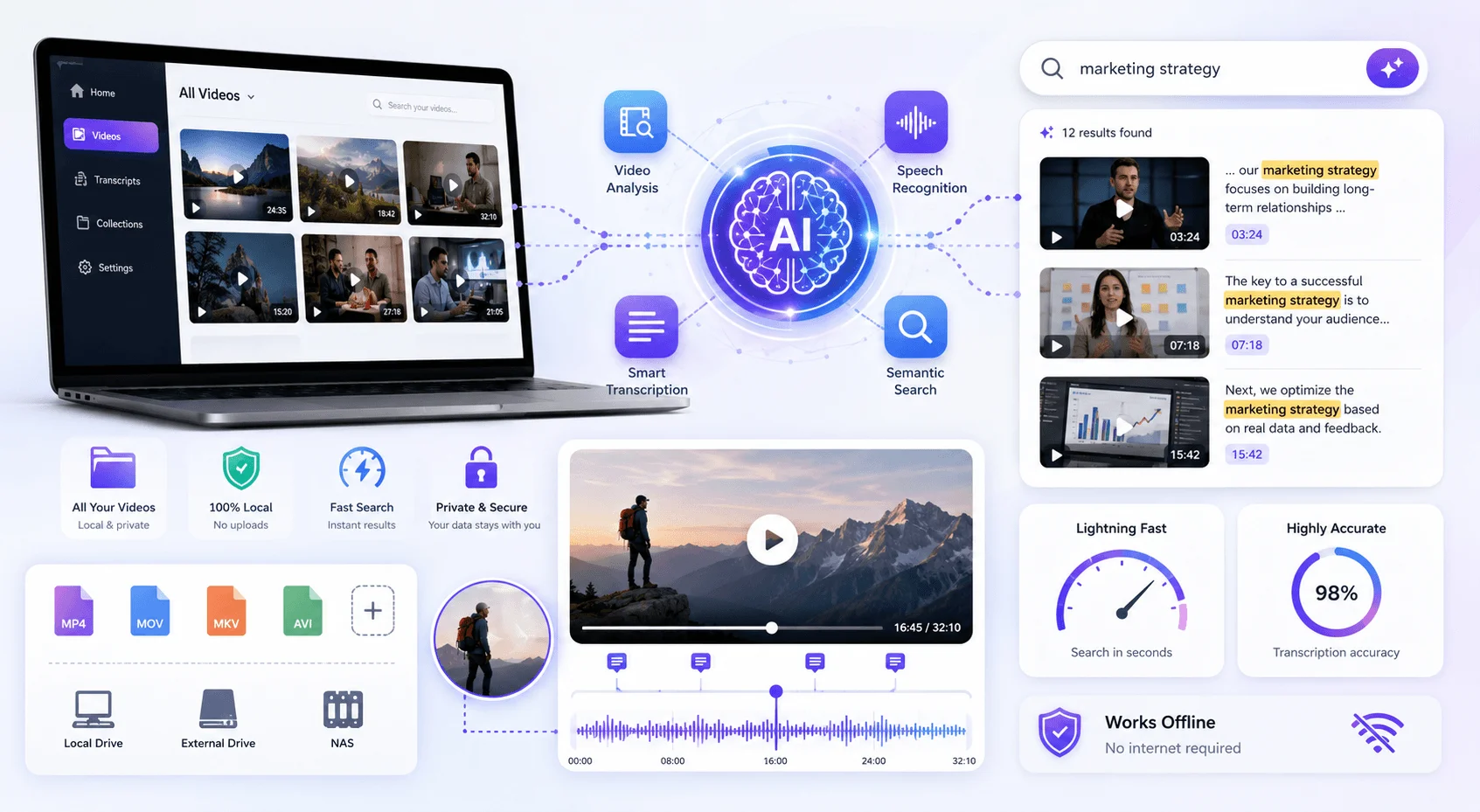
This is the section I'd read twice if I were you. Because on-device AI is the single biggest differentiator Clipto has, and it's also the thing most reviews gloss over with a vague "it's private!" before moving on. The mechanics matter — especially if you're a journalist, a lawyer, a healthcare worker, or anyone handling material that legally cannot touch a third-party server.
Traditional cloud AI works like this: you upload, then you search.
Clipto flips it. Your data stays where it already lives. The indexing happens on your machine.
On a MacBook Pro M5, Clipto indexed 2TB of video in roughly 24 hours. That's the number they demoed at launch, and it's a legitimately impressive figure for semantic search running locally.
But here's the nuance nobody mentions.
Clipto describes itself as "local-first, not local-only." Mac and Windows run locally. iPhone, Android, and Web are cloud-powered.
So if you download the mobile app expecting privacy-first transcription, you're not getting the local processing. You're getting a normal cloud service with a good interface.
Know which version you're on.
The Founder's Story Behind the Feature
Small detail, but it stuck with me.
On the Product Hunt launch thread, the team described testing Clipto in the desert. Minimal reception. Terabytes of footage sitting on a laptop. They needed one specific shot for the launch video.
The search query was: "the wide drone shot where the car enters the desert."
Not "a cinematic moment." Not a vibes search. A specific, literal, human description of a thing they remembered seeing.
And it worked.
That's the whole product in one sentence, honestly.
Clipto AI Pricing: What It Costs in 2026
Pricing is where I want you to slow down, because Clipto's structure has a wrinkle that has generated a meaningful volume of complaints. The headline numbers look competitive against tools like Otter.ai or TurboScribe. But the trial-to-paid conversion is where users get caught. Numbers first, then the warning.
Here's the current pricing:
Plan | Price | Billing |
|---|---|---|
Free trial | $0 | 7 days |
Pro (monthly) | $9.99 first month, then $24.99 | Monthly |
Pro (yearly) | $12.49/month | Billed annually |
Both paid tiers include unlimited video and audio search, automatic speech transcription, automatic people tagging, 99+ language support, analysis of videos up to 6 hours long, and access to advanced models.
That $9.99 figure? It's a first-month promotional rate. The real monthly price is $24.99.
The yearly plan at $12.49/month is the honest value play if you're committing.
⚠️ The Auto-Renewal Problem You Need to Know About
I debated whether to include this. Then I decided that leaving it out would make this review worthless to you.
Across Trustpilot and the Apple App Store, there's a consistent minority thread of users reporting unexpected charges after the 7-day trial. One reviewer describes five months of billing following an automatic trial conversion they say wasn't clearly disclosed, with a refund request refused. A business account reports unrecognized recurring charges and denied refunds.
Clipto's support team does respond publicly to these, directing users to email hugo@clipto.com.
So my advice is simple.
Set a calendar reminder for day six. Not day seven. Day six.
If Clipto works for you, keep it. If not, cancel with a day of buffer and screenshot the confirmation.
Clipto AI vs. Competitors: Full Comparison
You shouldn't evaluate any tool in isolation, so here's how Clipto stacks against the four alternatives people most often weigh it against. I've focused on the dimensions that actually change a buying decision rather than listing every feature. Pay particular attention to the local processing column — it's the only row where Clipto is genuinely alone.
Tool | Local Processing | Starting Price | Languages | Best For |
|---|---|---|---|---|
Clipto AI | ✅ Mac/Windows | $12.49/mo yearly | 99+ | Media archive search |
Otter.ai | ❌ Cloud only | $8.33/mo yearly | 3 | Live meeting notes |
TurboScribe | ❌ Cloud only | $10/mo | 98+ | Bulk transcription |
AssemblyAI | ❌ Cloud API | Usage-based | 99+ | Developers building apps |
Descript | ❌ Cloud only | $12/mo yearly | 23 | Editing video via transcript |
The read here is straightforward.
If privacy-first transcription and AI video search matter to you, Clipto has no direct competitor at this price. If you just want cheap, fast transcripts, three of these tools beat it. For more head-to-heads, see my best AI transcription tools roundup [INTERNAL].
How to Get Started With Clipto AI (Step-by-Step)
Say you've read all that and want to try it. This is a practical walkthrough from zero to your first searchable index, ordered the way I'd actually do it rather than the way onboarding suggests. The key insight: don't point Clipto at your entire drive on day one. Start small, verify output quality on material you know well, then scale.
Pick your platform deliberately. Want local processing? Download the Mac app. Windows is listed as coming soon. Mobile and web are cloud-based — fine for meetings, wrong for sensitive material.
Start the trial and immediately set your cancellation reminder. Day six. I mean it.
Index one folder, not everything. Point Clipto at a single project folder with 20–50 files you know intimately.
Run a "hard" search query. Describe a moment you remember but couldn't find by filename. That's the real benchmark.
Check transcription against known audio. Play a file you've heard. Count the errors. The 99% claim is marketing — your accents and jargon will produce a different number.
Connect it to your AI assistant via MCP. Most people skip this. It's the most valuable step.
Test one export format you actually need. SRT for subtitling, Word for editing. Verify formatting survives.
Decide before day six.
Who Clipto AI Is Genuinely Good For (And Who Should Skip It)
No tool is universally right, and I'd rather steer you correctly than sell you something. After going through the feature set, pricing, review corpus, and positioning, a clear picture emerges of who this was built for — and who'd be better served elsewhere.
✅ Video Editors and Filmmakers
This is the flagship use case. B-roll search and media asset management without a full MAM system is a genuine market gap, and Clipto plugs it. Pair it with an editor like CapCut and your footage stops being a graveyard.
✅ Researchers and Journalists
You need quotes traced to exact timestamps, and you need source material to never leave your device. Both are covered.
✅ Students
A semester of lecture recordings becomes a queryable study partner. Strong value at the yearly price.
✅ Compliance-Bound Professionals
Legal, medical, and finance workflows where cloud upload is a regulatory problem.
❌ Occasional Transcript Users
You're overpaying. TurboScribe or one of the free AI tools worth using in 2026 will serve you better.
❌ Teams Needing Collaboration
Clipto is built around your memory, singular. No meaningful shared-workspace story yet.
❌ Developers Building on an API
Go to AssemblyAI. Different product category entirely.
❌ Windows Users Needing Local Today
Still listed as coming soon.
What Real Users Actually Say
Reviews are noisy, so here's the aggregate rather than cherry-picked quotes. Clipto's own site advertises 4.7/5 on Trustpilot. The live Trustpilot page currently shows 4.6/5 across roughly 2,295 reviews. Small discrepancy, but I'd rather you hear it from me than notice it yourself and wonder what else got rounded up.
Praise clusters tightly: accuracy on long files with mixed accents, speed, clean interface, and the AI summary feature. Multiple executive assistants specifically call out meeting minutes as a killer use case.
Criticism clusters just as tightly: billing, translation quality on certain language pairs, and occasional stumbles on regional phrasing.
Internalize that last one. You're trading some linguistic precision for excellent structural summarization. Fine for most workflows. Not fine for legal transcription.
Frequently Asked Questions
Below are the questions I saw asked most often across Trustpilot, the App Store, and the Product Hunt thread. Short answers, no fluff.
Is Clipto AI free?
No. Clipto offers a 7-day free trial, but there's no permanent free tier. After the trial it converts to $24.99/month unless you claim the $9.99 first-month promotion or choose the yearly plan at $12.49/month.
Does Clipto AI work offline?
On Mac and Windows, yes — the desktop apps run on-device AI and index your media without an internet connection. The iPhone, Android, and Web versions are cloud-powered and require connectivity.
How accurate is Clipto AI's transcription?
Clipto claims 99% transcription accuracy across 99+ languages. User reviews broadly support strong performance on clear audio, but several report degraded results with heavy regional accents and unusual inflections.
Can I cancel Clipto AI after the free trial?
Yes, but cancel by day six rather than day seven. Multiple Trustpilot reviewers report being charged after trials auto-converted. Screenshot your cancellation confirmation.
Does Clipto AI work on Windows?
The Windows desktop app with local processing is listed as "coming soon" as of July 2026. Windows users can currently access Clipto through the cloud-based web version.
Is Clipto AI better than Otter.ai?
For AI video search and privacy, yes — Otter is cloud-only and supports far fewer languages. For live meeting transcription and team collaboration, Otter remains stronger.
What file formats does Clipto AI support?
Clipto handles standard audio and video formats and exports to Word, SRT, and VTT. It also accepts URLs from YouTube, Facebook, and cloud storage like Google Drive.
My Verdict on Clipto AI
Clipto AI is not the best pure transcription tool on the market. It's roughly tied with a half-dozen competitors on that axis.
But it might be the best AI video search tool available to an individual right now, and it's one of very few doing serious semantic search entirely on-device.
That combination — local processing, natural language retrieval, MCP integration — is genuinely ahead of the market. Industry coverage frames this as "the memory layer for personal AI," and I think that framing is more or less correct.
If you have a media archive that's become an unsearchable graveyard, try it.
Just set that day-six reminder.
Found this helpful? Share it with others who might benefit from these insights!
Submit Your AI Tool