
Quick answer: The Perchance AI story generator is a free AI story generator with no sign-up that writes fiction paragraph by paragraph from your prompt. It's great for brainstorming, outlines and warm-ups. It doesn't save your story or remember it between sessions, so copy your text out as you go.
Staring at a blank page is the worst.
So when I heard about the Perchance AI story generator, I had to check it out. A free tool that writes stories, with no login and no daily limit? Sounds too good to be true.
I went through the official pages, the community FAQ and independent reviews so you don't have to.
Here's what's real, what's hype, and how you can use it today.
What Is the Perchance AI Story Generator?
Before you type a single prompt, you should know what you're dealing with. This isn't a standalone app from a big startup. It's one popular tool living on a community platform, and that background explains both its charm and its quirks. Here's the short version, followed by a peek at how it actually works.
The official page calls it a free, unlimited AI story writer. You enter a prompt, and it writes long stories one paragraph at a time.
You can steer the plot, too.
It handles horror, fantasy, mystery, anime and pretty much anything else.
Simple. Almost suspiciously simple.
How the Perchance Story Generator Works
Curious about the engine under the hood? So was I. This section covers where the tool comes from, what technology sits behind it, and the one thing nobody outside the developer can confirm: the exact model. Knowing the difference between fact and guesswork will keep your own writing credible.
Perchance began as a site for building random text generators. The community's AI FAQ says the AI tools are an add-on, not the main purpose.
That's why you'll see procedural generation roots in the tool. If you want the background, procedural generation is how games build whole worlds from simple rules.
On top of that sits a large language model. A large language model predicts the next word, again and again. That's the core of natural language generation.
So which model is it?
The FAQ, last edited in July 2024, says the text plugin used a Llama-based model. More recent Lemmy discussions guess at a Google Gemma model. Neither is officially confirmed, so treat both as unverified.
Perchance AI Story Generator Features and Variants
Features decide whether a tool deserves your time. The surprise here is variety: Perchance isn't one generator, it's a small family of them. Each version tweaks the experience for a different kind of writer, from plotters to roleplayers. Pick the right one first, and you'll skip a lot of frustration.
The core tool gives you unlimited story generation, fast output and a "what happens next" box to guide the plot.
Beyond that, you've got options:
AI Story Outline Generator: builds a story outline from a topic, which you can expand chapter by chapter.
Enhanced AI Story Generator: adds a story bible for characters and locations, perspective and genre selectors, and local text-to-speech.
AI Story Generator with Pictures: generates images alongside your story.
Ultimate Story Generator: writes chapter by chapter, with a built-in character generator.
Not sure where to start?
If you like planning, try the outline version. If you like diving in, go straight to the enhanced one.
Into fandom writing? You might also enjoy our guide to the headcanon generator for fresh character ideas.
How to Use the Perchance AI Story Generator (Step by Step)
Enough theory. Let's write something. This step-by-step guide takes you from a blank screen to a usable draft, and it works whether you write for fun or for a living. The tool is simple, but your results depend heavily on how well you prompt it, so pay attention to the first step.
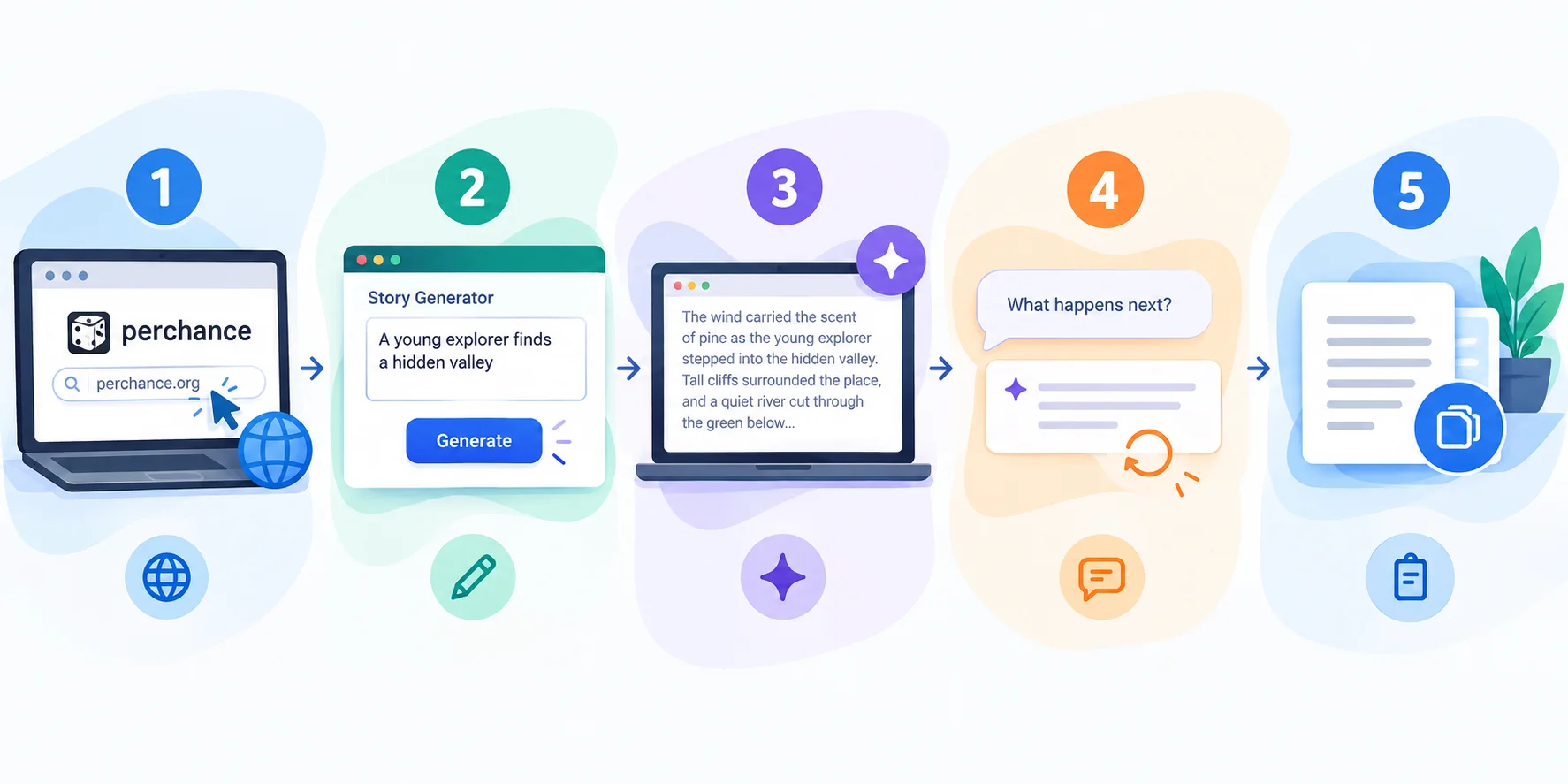
Here's the quick version:
Open the real tool on perchance.org.
Write a specific prompt.
Generate one paragraph.
Steer with "what happens next."
Copy your text out before closing the tab.
Now the details.
Step 1: Write a Strong Prompt
A vague prompt gets a vague story. That's true for every AI story generator, and it's the heart of good prompt engineering. Before you hit generate, spend two minutes here. It saves you ten minutes of rewrites, and it's the biggest lever you control.
One reviewer at Macaron suggests this shape: a setting, a character with one specific tension, a tone marker, and one thing that must happen.
Try it yourself.
For example: "A rain-soaked harbor town. A tired lighthouse keeper who distrusts his new assistant. Mystery tone. Someone must vanish before dawn."
See how much sharper that is than "write me a mystery"?
Use concrete tone words, too. "Rain-soaked and suspicious" beats "dark."
Step 2: Steer, Edit and Save
Generating text is the easy part. Keeping it coherent, and not losing it, is where you earn your keep. This step shows you how to guide the story as it grows and how to protect your work, because a closed tab can erase a great draft in one click.
Here's what to do:
Generate one paragraph at a time.
Use the "what happens next" box to nudge the plot.
Delete or rewrite anything that drifts off tone.
Paste your text into your own document often.
Why so often?
According to the AI FAQ, you generally can't retrieve past generations unless the page saves them in your browser.
Save early. Save often.
Perchance AI Story Generator Limitations and Risks
Every free tool has a catch, and you'll trust me more if I'm upfront about it. This section covers the memory problem, the ads, the lack of filtering, lookalike sites and the copyright gray area. None of these are dealbreakers. They're simply things you should know before building a project on top of the tool.
Let me be straight with you.
The tool is a brilliant warm-up. It's not a novel-writing machine.
Memory Drift and the Context Window
Ever had a story suddenly forget what's going on? That's usually a context window problem, and it affects text generation tools in general. Models only keep track of so much text at once. Here's how it shows up and what you can do about it, since it's the biggest limitation for longer projects.
One Macaron reviewer reports the story starts losing the thread after roughly 800 to 1,000 words. That's a single tester's experience, and Macaron sells a competing product, so take the number as a rough signal, not a benchmark.
Still, it fits what you'd expect from a free tool with no cross-session memory.
A character tense in paragraph two might be calmly eating dinner in paragraph six.
The fix is easy. Keep a short summary of your plot and characters, then paste it back in when things wobble. The enhanced version's story bible helps here, too.
Is Perchance AI Safe? Ads, Filters and Lookalike Sites
"Is it safe?" is one of the questions people search most, and most articles skip it. Safety here means three practical things: how the site pays its bills, what the text filters do, and how to avoid fake copies. Check each before you use the tool seriously.
Ads: the FAQ says the AI generators are supported by ads at the bottom of the screen when you're logged out. Ad blockers can break the page.
Filters: the FAQ describes the text model as unfiltered, so your prompt largely decides what you get. Use that responsibly, and keep it away from kids.
Lookalikes: Macaron warns that clones outrank the real tool in search. Make sure the address says perchance.org. Sites like PerchanceStory are separate, GPT-4-branded products, not Perchance.
Copyright and Commercial Use
Can you publish what the tool writes? That question matters if you blog, self-publish or sell anything. The honest answer is "it depends," and the rules are still evolving. Here's what the community FAQ says, and where you should look for the legal side.
The FAQ states that you bear all responsibility for how you use the output. Perchance accepts no legal connection to it.
Copyright law for AI-generated text is a moving target. Start with the US Copyright Office's AI page, and talk to a lawyer if money is involved.
My rule of thumb? Treat the output as raw material. Rewrite it in your own voice before you publish.
Run Your Own 10-Minute Drift Test

Reviews are useful, but your own test is better. This quick experiment shows you exactly where the Perchance AI story generator loses the plot, and how it compares with other tools. It takes ten minutes, costs nothing, and gives you evidence you can trust instead of someone else's opinion.
Here's how:
Write one prompt with two characters in conflict.
Run it in Perchance and keep generating until you hit about 1,200 words.
Mark the paragraph where the tension or details break.
Repeat in one or two alternatives.
Compare the word counts.
Simple, right?
Now you've got your own data, and you'll know which tool fits your project.
Perchance Alternatives Compared
Sometimes the free tool just isn't enough. Maybe you need memory, polish or a manuscript manager. That's when Perchance alternatives come in. The table below compares popular options, but remember the prices come from third-party roundups, so confirm each one on the vendor's own page.
Tool | Cost (per roundups) | Memory | Best for |
|---|---|---|---|
Perchance | Free, no sign-up | None across sessions | Warm-ups, ideas |
ChatGPT | Free tier; Plus about $20/mo | Limited, manual | Controllable scenes |
Claude | Free tier; Pro about $20/mo | Manual workflow | Long-form prose |
NovelAI | About $10/mo | Lorebook | Fine prose control |
Sudowrite | About $19/mo and up | Story bible | Full manuscripts |
AI Dungeon | Free plus paid | Inconsistent | Interactive play |
Quick bias note: Macaron and this WPS roundup are vendor blogs. Use them for leads, not gospel.
Want to see how the big chatbots stack up? Read our ChatGPT vs Claude vs Gemini comparison before you pay for anything.
So which should you pick?
For zero friction, stay with Perchance. If you want an AI story generator that remembers, pay for something built for it, and browse our best ChatGPT alternatives for more options.
Perchance AI Story Generator FAQ
Is the Perchance AI Story Generator Free?
Yes. The official page says it's free and unlimited, with no account needed. The catch is advertising: the community FAQ says the AI generators are funded by ads when you're logged out. So you pay with attention, not money. For a free AI story generator, that's a fair trade, but don't expect saved history or a built-in manuscript manager.
Do You Need to Sign Up?
No. The tool advertises no sign-up and no login. You open the page, type and write. Be careful with SEO articles claiming otherwise. Some say you need an account or that Perchance has an API. The FAQ says the AI plugins can't be used through the API or embedded outside Perchance's own domain.
Can You Use the Stories Commercially?
Maybe, but it's your risk. The FAQ says you're responsible for how you use the output, and copyright rules for AI text are still developing. Check the US Copyright Office's AI initiative and consult a lawyer for commercial work. Either way, rewrite the text in your own voice first.
Which AI Model Does Perchance Use?
Nobody outside the developer can say for sure. The FAQ, last edited in 2024, mentioned a Llama-based model, while newer user guesses point to Google's Gemma. Those are unconfirmed. If you write about this, say "unconfirmed," and you'll keep your content honest.
Final Thoughts on the Perchance AI Story Generator
So, is it worth your time? Yes, with the right expectations. This last section pulls everything together: what the tool does well, where it stumbles, and how you can get the most out of it right now. Then you can stop reading about writing and start doing it.
The Perchance AI story generator is a fantastic warm-up tool. It's fast, free and refreshingly low-friction.
It's not a replacement for a real writing workflow.
Use it to beat writer's block, test a premise or sketch an outline. Then copy your text out, edit it in your own voice and keep your own notes on characters and plot.
Found this helpful? Share it with others who might benefit from these insights!
Submit Your AI Tool